
If you are embedding the Helply and want the agent to "know" things about a user, you have two options:
Contacts (recommended): verified by your backend and safe to use for actions/integrations.
User attributes: the easiest way to give the Helply widget extra context about the current user -the kind of information that helps the agent speak more naturally and follow your Guidance.
- For Open Attributes (unsecure info), see User Attributes page
- For Contacts + identity verification, see Contacts page
When to use them?
Contacts are our recommended approach. They are great when you want to:
Run actions with contacts data
Use guidance in the secure context
You provide sensitive information like user id.
User attributes are great for:
- First name / last name
- Locale / timezone
- Lightweight product context (plan, tier, seat count) as long as it’s not a sensitive information
- Any “help the agent respond better” context that’s not sensitive
How to use them
Go to: Contacts
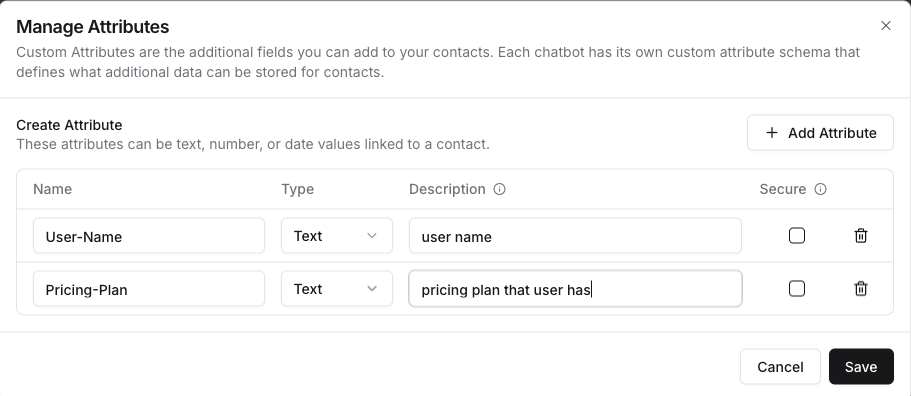
Click on the Attributes button. This will open the Manage Attributes modal.
Here, you can set attributes and their types.
Name: name of the attribute. It will be used for creating contact or for filling user attribute.
Type: type of the field.
Description: short description of the field. It helps AI Agent to understand purpose of this field.
Secure: for uncheck for User attribute and checked for Contacts. Secure fields can only be populated by running identify call